
That message from my Manager
I got a message from my manager unexpectedly.
“Hey. A team is converting a MSSQL database to MongoDB. Can Qlik Replicate capture deletes from the MongoDB?”
I thought this was an abnormal question; why wouldn’t QR support deletes?
Not wanting to make an assumption that may be false and have profound consequences later in a conversion project, I looked up the Qlik documentation.
Nothing in the documented “Limitations and considerations.”
Just as a safeguard I also did a google search and a forum search to see if anything else turned up.
Again nothing.
I pinged back to my manager.
“QR should capture deletes simply fine. Where did you hear that QR had problems with MongoDB deletes from?”
“Oh. The project manager heard from a Mongo guy that Qlik does not work.”
I bit my lip. To me that seemed the same as getting health advice off a random guy at the pub who saw something on Telegram.
But I realised now that even though I had official Qlik documentation backing me up; the burden of proof was back on me.
Back into the world of containers
Qlik Replicate in a docker container has been an extremely useful tool on my Linux development machine. It enables me to quickly test various aspects of QR without interrupting the official dev environment; or fighting with the cloud team to get a proof-of-concept source system set up.
First, I had to set up a MongoDB docker container. Specifically, the MongoDB had to have a “replica”; a standalone wouldn’t work. Since this was a POC; I didn’t need a fully fledge – multi replica – ultra secure cluster; just something simple and disposable.
After fumbling around with a number of examples (Gemeni – how could you fail me!); I came across a page by “Gink” titled “How to set up MongoDB with replica set via Docker Compose?”
It was simple and had exactly what I needed.
Dockerfile:
FROM mongo:7.0
RUN openssl rand -base64 756 > /etc/mongo-keyfile
RUN chmod 400 /etc/mongo-keyfile
RUN chown mongodb:mongodb /etc/mongo-keyfile
docker-compose.yml:
# From https://ginkcode.com/post/how-to-set-up-mongodb-with-replica-set-via-docker-compose
version: '3.8'

services:
  mongo:
    build:
      context: .
      dockerfile: Dockerfile
    container_name: mongodb-replicaset
    restart: always
    environment:
      MONGO_INITDB_ROOT_USERNAME: root
      MONGO_INITDB_ROOT_PASSWORD: root
    ports:
      - 27017:27017
    command: --replSet rs0 --keyFile /etc/mongo-keyfile --bind_ip_all --port 27017
    healthcheck:
      test: echo "try { rs.status() } catch (err) { rs.initiate({_id:'rs0',members:[{_id:0,host:'127.0.0.1:27017'}]}) }" | mongosh --port 27017 -u root -p root --authenticationDatabase admin
      interval: 5s
      timeout: 15s
      start_period: 15s
      retries: 10
    volumes:
      - data:/data/db

volumes:
  data: {}
Connection string
mongodb://root:root@localhost:27017/?authSource=admin
Please visit Gink’s page
Connecting to Qlik Replicate
The great thing is that we don’t have to mess around installing extra ODBC drivers that can make the Qlik Replicate docker image complex.
So with the MongoDB and the Qlik Replicate docker containers up and running; we can how create a new endpoint with the following settings:
| Field | Variable |
| MongoDB Deployment | Standard |
| Hosts | host.docker.internal |
| Authentication Method | SCRAM-SHA-256 |
| Username | root |
| Password | root |
| Authentication database name | admin |
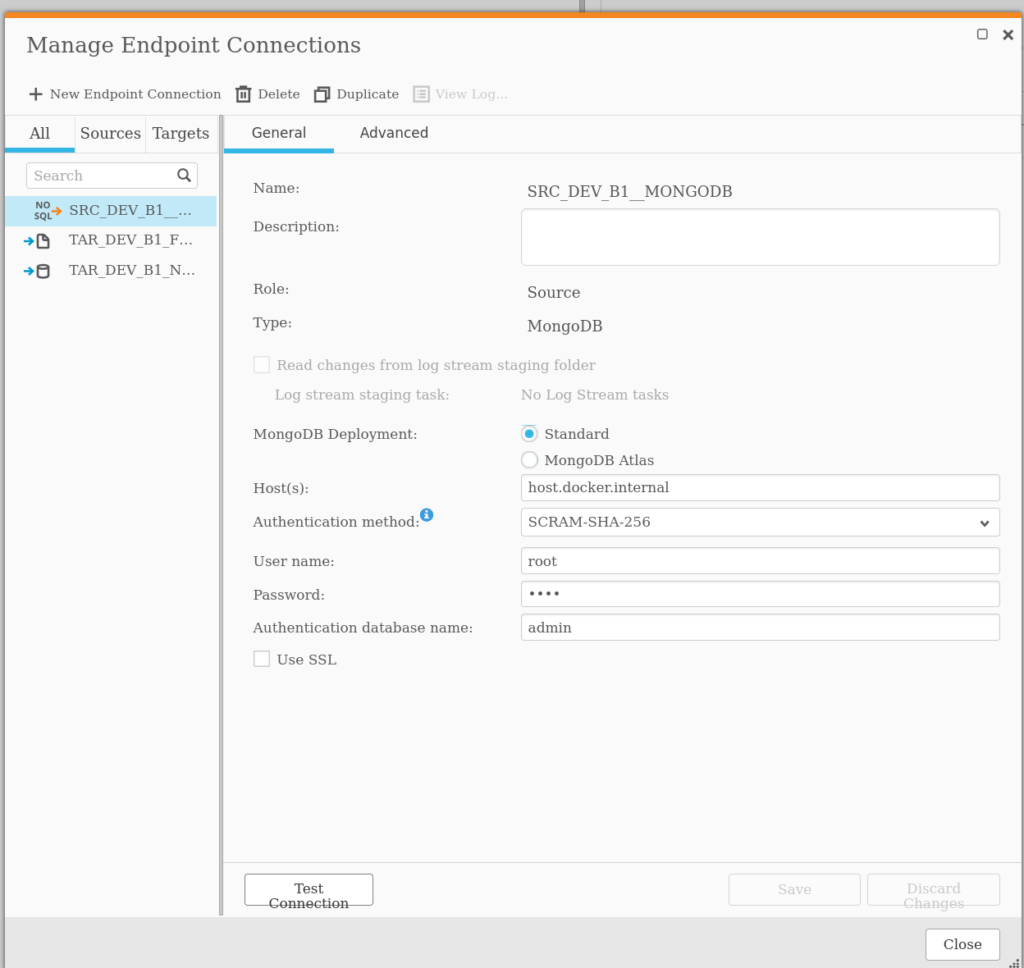
A test connection confirmed that the connection was working as expected.
Proving that deletes are working
Getting close to resolving the burden of proof. I got our GenAI to create a simple python script to add, update, and delete some data from the Mongo Database and set it running:
import pymongo
import random
import string
import time

def generate_random_string(length=10):
    """Generate a random string of fixed length."""
    letters = string.ascii_lowercase
    return ''.join(random.choice(letters) for i in range(length))

def add_random_data(collection):
    """Adds a new document with random data to the collection."""

    new_document = {
        "name": generate_random_string(),
        "age": random.randint(18, 99),
        "email": f"{generate_random_string(5)}@example.com"
    }

    result = collection.insert_one(new_document)

    print(f"Added: {result.inserted_id}")

def update_random_data(collection):
    """Updates a random document in the collection."""
    if collection.count_documents({}) > 0:
        # Get a random document using the $sample aggregation operator
        try:
            random_doc_cursor = collection.aggregate([{"$sample": {"size": 1}}])
            random_doc = next(random_doc_cursor)
            new_age = random.randint(18, 99)

            collection.update_one(
                {"_id": random_doc["_id"]},
                {"$set": {"age": new_age}}
            )

            print(f"Updated: {random_doc['_id']} with new age {new_age}")
        except StopIteration:
            print("Could not find a document to update.")
    else:
        print("No documents to update.")

def delete_random_data(collection):
    """Deletes a random document from the collection."""
    if collection.count_documents({}) > 0:
        # Get a random document using the $sample aggregation operator
        try:
            random_doc_cursor = collection.aggregate([{"$sample": {"size": 1}}])
            random_doc = next(random_doc_cursor)

            collection.delete_one({"_id": random_doc["_id"]})

            print(f"Deleted: {random_doc['_id']}")
        except StopIteration:
            print("Could not find a document to delete.")
    else:
        print("No documents to delete.")


if __name__ == "__main__":
    print("Starting script... Press Ctrl+C to stop.")

    try:
        client = pymongo.MongoClient("mongodb://root:root@localhost:27017/?authSource=admin")
        db = client["random_data_db"]
        collection = db["my_collection"]
        # The ismaster command is cheap and does not require auth.
        client.admin.command('ismaster')
        print("MongoDB connection successful.")
    except pymongo.errors.ConnectionFailure as e:
        print(f"Could not connect to MongoDB: {e}")
        exit()

    while True:
        try:
            add_random_data(collection)
            add_random_data(collection)
            add_random_data(collection)

            update_random_data(collection)
            delete_random_data(collection)

            # Wait for five seconds before the next cycle
            time.sleep(5)

        except KeyboardInterrupt:
            print("\nScript stopped by user.")
            break
        except Exception as e:
            print(f"An error occurred: {e}")
            break

    # Close the connection
    client.close()
    print("MongoDB connection closed.")
With the script running and adding, updating and deleting data to the MongoDB; a QR task can be created to read from the database “random_data_db” and collection “my_collection”
And voilà. Data is flowing through Qlik Replicate from the MongoDB.
And more importantly deletes are getting picked up as expected.
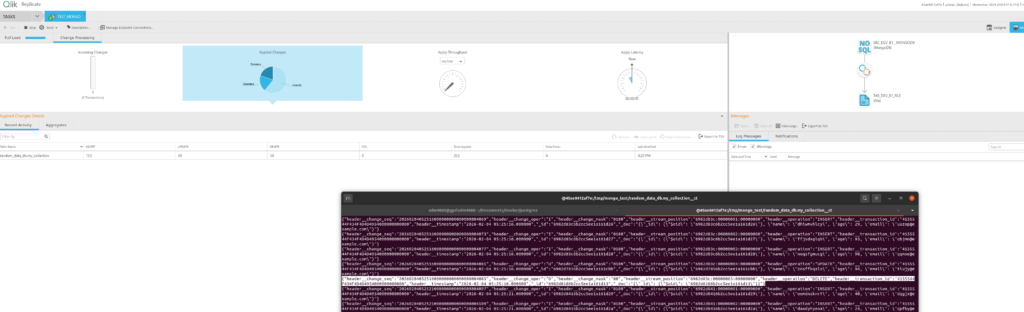
{
	"header__change_seq":"20260204052516000000000000000004085",
	"header__change_oper":"D","header__change_mask":"80",
	"header__stream_position":"6982d83c:00000005:00000000",
	"header__operation":"DELETE",
	"header__transaction_id":"4155544F434F4D4D4954000000000000",
	"header__timestamp":"2026-02-04 05:25:16.000000",
	"_id":"6982d8186b2cc5ee1a161d13",
	"_doc":"{\"_id\": {\"$oid\": \"6982d8186b2cc5ee1a161d13\"}}"
}
Conclusion
And voilà. Data is flowing through Qlik Replicate from the MongoDB.
And more importantly; deletes are getting picked up as expected.
If you have come to my humble website after googling “Can Qlik Replicate replicate deletes from a MongoDB?” well, the answer is “Yes – Yes it can.”
I can only speculate where that rumour came from. Maybe it was from an older version of QR or MongoDB that the person in question was referring to? Or some very abnormal setup of a MongoDB cluster?
Or some complete misunderstanding.
Anyway, I have meeting in the next hour or two with the project team; let us find out.