EBCDIC – my perpetual nightmare
Before I have written about EBCDIC; and the tribulations I have come across
With the post festive system haze still on – I spent a full day trying to work out another encoding problem that came up in our exception table.
Let me take you on a journey.
It starts with MS-SQL.
We have Qlik Replicate replicating data from a DB2/zOS system into a MS-SQL system. I was investigating why there were inserts missing from the target table and exploring the dbo.attrep_apply_exceptions table I notice a bunch of INSERTS from another table in the exception table:
/*
CREATE TABLE dbo.destination
(
	add_dte numeric(5, 0) NOT NULL,
	chg_dte numeric(5, 0) NOT NULL,
	chg_tme varchar(6) NOT NULL,
	argmt varbinary(10) NOT NULL,
	CONSTRAINT pk_destination PRIMARY KEY CLUSTERED
	(
		argmt
	) WITH (DATA_COMPRESSION = ROW) ON [PRIMARY]
) ON [PRIMARY]
*/

INSERT INTO [dbo].[destination] ( [add_dte],[chg_dte],[chg_tme],[argmt])  VALUES (46021,46021,'151721', 0x35333538C3A302070000);
I thought it would be a good place to start by substituting the failed insert into a temp table and using the temp table to investigate downstream data flows.
So:
DROP TABLE IF EXISTS ##temp_destination;

SELECT *
INTO ##temp_destination
FROM [dbo].[destination]
WHERE 1 = 0;

INSERT INTO ##temp_destination ( [add_dte],[chg_dte],[chg_tme],[argmt]) VALUES (46021,46021,'151721', 0x35333538C3A302070000);
But as I was substituting the temp table into objects downstream – I was just getting logical errors. Comparing the temp table against other data that already existed dbo.destination; it looked not right.
Working Upstream
I thought it would be a good place to start by substituting the failed insert into a temp table and using the temp table to investigate downstream data flows.
Since we just merged a system into our DB2/zOS system; my initial thought it was a corrupted record coming from a merge process. I contacted the upstream system owners and asked for help.
They came back and said the record was fine and the issue must be in the QR system converting the data wrong. This did not make sense – if there was a issue in the QR system; it would have been picked up in testing. Also, there would be lots of exceptions in dbo.attrep_apply_exceptions. I had confidence that QR was handling it right.
Not trusting what the DB2/zOS team had told me; I created a temp Qlik task to dump out that table into a test database.
Using the other values in the record; I could look the record up in the table and compare the two.
For the field argmt it came back as:
0xF5F3F5F846022F00000F
This looked nothing like what was in the exception table.
EBCDICy epiphany
Of course – it took a while; but it finally struck what was going on.
The field argmt had sections encoded in EBCDIC. This was getting brought across as bytes to MS-SQL. There was a downstream trigger that was failing in the MS-SQL database. But when it was getting written out into the exception table; it was getting written as ASCII (or possibly Windows-Latin) encoding.
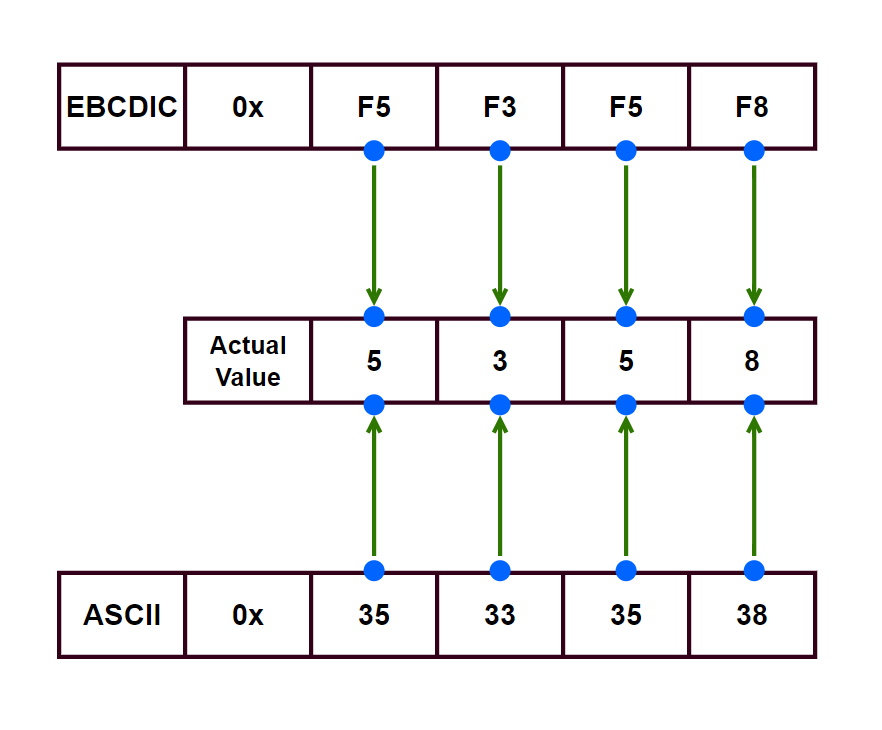
(Only showing start of bytes as this is what we use downstream)
With me just copying the insert statement and using it as is; I was treating ASCII bytes as EBCDIC; causing all sorts of logical errors downstream.
Where to from here?
I’m going to raise this abnormality with Qlik. I am not sure if it is a “bug” or a “feature”; but good to get clarification on that point.
I also will need to educate our users on how to interpret the values in dbo.attrep_apply_exceptions so not to stumble into mistakes that I did.
As for fixing the data itself – since we have the full dump of data from the table and the data is slow moving; I can substitute the values from the data dump into the problem INSERT statement.
This should allow it to run just fine.