
Introduction
At the time of writing – I have been using Qlik Replicate for over six years. From a blank slate – I built the Qlik Replicate environment in our organisation with seven environments, with hundreds of tasks which are transferring over trillions of changes.
I had technical guidance from a consultancy firm on set up and creation of Qlik tasks; but little other help in the overall landscape, from simple things like task naming conventions, management and best practices.
In a quiet afternoon – I am taking time to write down my experiences with building and running a Qlik Replicate platform. What worked and a good idea; what didn’t work and what I would do differently if I had my time again.
I hope this helps you out in planning and creating your Qlik Replicate environment.
Best practices on QR Task planning
Maximum of two tasks reading from a Source system
Projects love adding new QR tasks to Qlik Replicate instead of expanding and enriching existing QR tasks. Creating a new task allows projects to get a tailored solution to their needs and means they don’t have to regression test changes to the original task. This is a tactical reaction and will strategically hurt an environment in the long term.
Generally, I recommend you only have a maximum of two tasks running off a source system.
- One task for the speed / streaming layers that is a very focused task that only capture changes on a specific tables and columns.
- The other task is for the Data Lake / Warehouse – large “get all columns from all tables” type task that capture the changes in micro batches
There are several reasons why you want to group up tasks as much as possible:
- Less strain on the source system. Depending on the type of source system; each QR task requires a new connection that results in extra overhead on the system and the Qlik Replicate system.
- Less tasks Qlik Replicate admin to manage. This makes process for maintaining QR and the source system of dealing with two tasks instead of a dozen of tasks.
- Creates a distinct source of truth. One change read off the database might be multiple tasks might have different header attributes. For instance, the changeSequence variable will be different between two tasks replicating from the same table, and the timestamp will vary slightly. If multiple tasks are reading the source database – it may make it difficult in reconciling between the different streams.
- Utilising the power of cloud-based targets. QR servers usually constrained by finite limits. So, use QR tasks to read once and write to a cloud-based target like Kafka or Big Query and use their horizontal scalability to service multiple requests.
If there is a need for more QR tasks reading off a source system – consider using to log streaming sooner rather than later. It can be difficult switching over high transactional QR Task from reading directly from the database to a log streaming source without an outage to the source team.
Do not use Source lookup functions
With our initial builds we got trapped into building QR tasks with source lookups that enrich data that gets written to kafka topics. This was a near sighted workaround because the downstream developers couldn’t join the kafka data streams. This ended up in a big mess as the business kept requesting for more lookups to solve their data requirements instead of fixing up the joining logic.
We’re at a point that a change to one table will fire off TEN source lookups back to the source system.
/* This is an sanitised example of what one of our table transfers is running when it captures one change :( */

SELECT
	M.ROW_ID,
	M.FIELD_1,
	M.FIELD_2,
	(SELECT T1.FOREIGN_FIELD_1 FROM SCHM.TABLE_1 T1 WHERE T1.PK = M.FK_1) AS ENRICHED_FIELD_1,
	(SELECT T2.FOREIGN_FIELD_2 FROM SCHM.TABLE_2 T2 WHERE T2.PK = M.FK_2) AS ENRICHED_FIELD_2,
	(SELECT T3.FOREIGN_FIELD_3 FROM SCHM.TABLE_3 T3 WHERE T3.PK = M.FK_3) AS ENRICHED_FIELD_3,

	/* And yes - there are lookups in lookups :( */
	(
		SELECT
			(
				SELECT
					T5.FOREIGN_FIELD_5
				FROM SCHM.TABLE_5 T5
				WHERE
					T5.PK = T4.FK_4
			) AS NESTED_FIELD_1
		FROM SCHM.TABLE_4 T4
		WHERE
			T4.PK = M.FK_4
	) AS ENRICHED_FIELD_4
FROM SCHM.MAIN_TABLE M
WHERE
	M.PREDICATE_1 = x;
Lucky the changes from the source system are low volume; but you really notice the latency exponentially climbs if there are any batch changes running on source system. If I was the source system owners and noticed that one change results in ten queries back – I would be questioning the selling point that Qlik Replicate is a “light touch” to their system.
Apart from the source system impact and the latency; source lookups have the following problems:
- Source lookups are hard to develop and maintain – the UI isn’t a nice development environment to work on source lookups; and they can get very cumbersome to work with when you have “nested” lookups
- With latency – source lookups could lookup the wrong data relative to the time of the change.
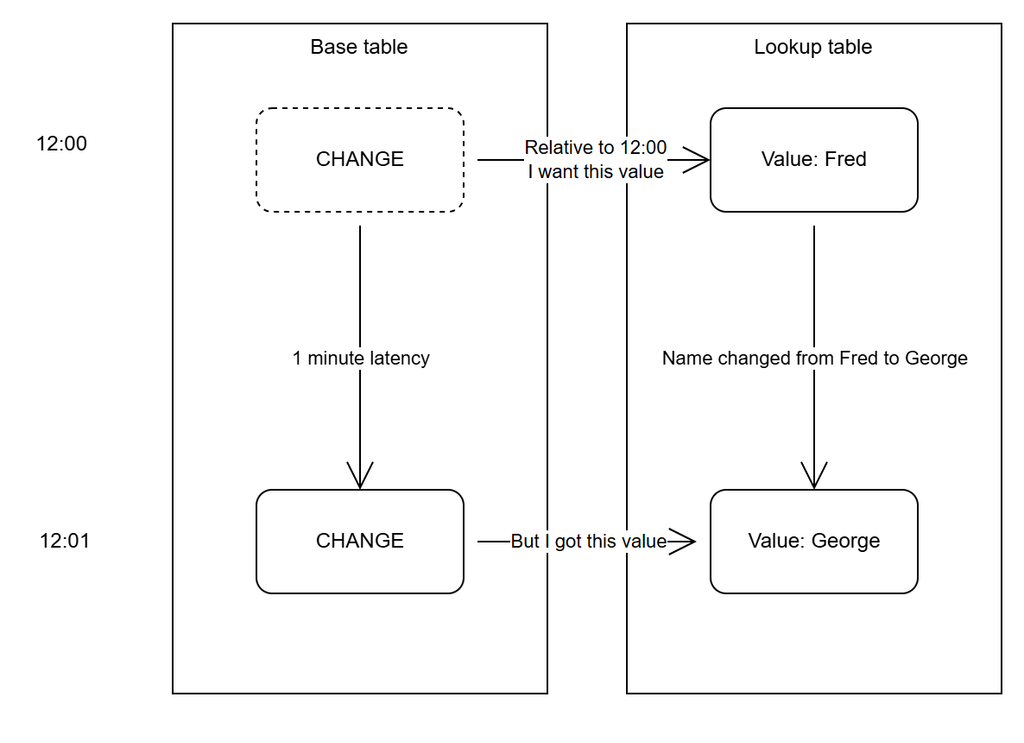
- They hide business rule inside Qlik Replicate – adding a black box to the data transformation
- QR will not report if a lookup fails – only placing a NULL in the downstream field
In summary – avoid source lookups. Invest in the right tools and knowledge downstream to join the data together.
Keep business rules out of QR tasks
It is important to treat Qlik Replicate as a “Change Data Capture” tool and not as a traditional ETL tool. Keep QR to simply capture changes and pushing the data downstream. While there are options of the use of functions in tasks to transform the data; keep transformations out and use the power of downstream systems to do transformations.
This also stops QR tasks becoming a business rule “black box”. Users can trust what goes into QR comes out the other side unchanged.
Exception
Renaming columns to avoid syntax issues with downstream systems is acceptable – but the renamed column names should be easy to derive back to the original column name.
Best practices on QR Task design
Each QR task has a unique identifying number
A unique identifying number for a QR task is important to refer to a task with no ambiguity.
Keep a register of assigned out task numbers so developers don’t accidentally use the same number multiple times.
Also, the numbers don’t have to be used sequentially. This allows “blocks” of numbers to roughly indicate the task’s purpose.
For instance; in our environment:
- Task 1 to 99 – our speed layer QR tasks
- Task 100 to 199 – our AWS Data Lake tasks
- Task 200 to 399 – our GCP Data Lake tasks
- Task 800 to 899 – once off adhoc load tasks
- Task 900 to 999 – log streaming tasks
Using task numbers prevents ambiguity issues that might arise when referring to QR tasks.
Have a consistent naming standard for QR tasks
QR tasks should follow a naming standard that with a quick glance a QR admin can derive basic information on the task. A naming convention is important for keeping consistency and helping with administering the Qlik Replicate environment.
Our QR platform has the following task naming convention:
<environment>_T<task id>_<destination system>_<source system>_<optional: extra info>_<_optional:_ task type>
So, for instance:
PRD_T201_DL_CUSTSYS
Is a:
- Production task
- Has a unique task id of “201”
- Is going to the “DL” (Data Lake”)
- Is sourced from the system CUSTSYS
While These two tasks:
PRD_T202_DL_CUSTSYS_SCHD
PRD_T203_DL_CUSTSYS_ADHOC
Have the suffix “SCHD” and “ADHOC”
This suffix is to distinguish between different types of “full” loads. SCHD = Schedule, while ADHOC = Once off / adhoc loads. This is important for QR admins to determine immediately if a task is triggered by a schedule. If the admins are told to turn off any Qlik Replicate tasks from the system CUSTSYS as they are patching the source system; they will know that T202 will not trigger. But since T203 are on a schedule – they need to investigate if the task will be triggered during that window.
Each QR task table has a “version” field added
For each table in a task; we add a “version” field; which we call “the x_y field”
This field contains the version number relating to the changes of that table and that version number links back to a wiki document that records details of the change. We record; who did the change, the date the change was developed, the request number the change was requested and the description of the change.
This version field has the following important features:
- It adds a tracking of changes of the logic on the QR tasks table.
- In the downstream data – the downstream systems can see the exact moment when the old version is superseded by the new version. This is important for subtle changes that might not be visible for a downstream system. For instance, a new field in a QR task will be easy to detect in downstream data. But something like a fix in the filter will be hard to determine when it takes effect in the data flow.
The version field has helped us out numerous times when downstream systems asked us who requested changes to QR tasks. We can grab the task’s table version and check back our change register and the corresponding request number
Best practices on QR Development
Develop a coding framework around QR tasks
A QR task is described by a json file. Through modifying the json file; you can change the task.
To make it easier for developers working with QR tasks; develop a coding framework around the json task in the standard language of choice.
For instance, we have a python class that encapsulates a task’s json file and through the class methods we can describe and manipulate the task.
These are the methods we have in the base QR task
General Helpers
- get_task_name(self): Retrieves the name of the task.
- get_task_source(self): Retrieves the name of the source connector.
- get_task_target(self): Retrieves the name of the target connector.
- get_owner_table_list_from_task(self): Returns a sorted list of dictionaries containing table_owner and table_name for all explicitly included source tables.
- get_owner_table_list_from_task_array(self): Returns the owner and table names as a 2D array ([[owner, table_name], …]).
- get_table_list_from_task(self): Returns a list of table names only (without schema/owner prefixes).
- is_logstream_task(self): Checks whether the task is configured as a log stream task (_LOG_STREAM).
- get_tasks_manipulations(self): Returns the list of table manipulations defined in the task.
- is_manipulations_in_task(self): Checks if the task definition contains a manipulations section.
- get_table_kafka_topics(self): Returns a list of dictionaries with table names and their target $topic expressions.
- get_custom_table_names(self): Returns a list of custom target table names and owners mapped in manipulations.
- get_table_filters(self): Retrieves all filter expressions set on tables in the manipulation section.
- get_a_table_filter(self, table_name): Returns the filter expression for a specific table by name.
- get_logging_levels(self): Returns a dictionary of the logging levels configured across all task components.
- get_transfer_type(self): Returns a 3-element tuple of booleans indicating if Full Load, Apply Changes, and Save Changes are enabled.
- get_global_manipulation_rules(self): Returns the list of global manipulation rules defined for the task.
Migration Helpers
- change_source_connector(self, new_source_name): Updates all references to the source connector throughout the task JSON.
- change_target_connector(self, new_target_name): Updates all references to the target connector across the task JSON.
- change_task_name(self, new_task_name): Updates the task name across the configuration (truncated to 32 characters).
- update_kafka_topic(self, destination_table_name, new_kafka_topic, new_owner_name=None, new_table_name=None): Updates the $topic computation expression and optionally the target owner and table name for a specific table.
- update_source_tables_owner(self, old_owner, new_owner): Replaces the source schema/owner across manipulations, configurations, and included table definitions.
- update_source_table_filter(self, destination_table_name, new_filter): Updates the filter expression for a specified table manipulation.
- update_target_details_for_bq(self, project_id, dataset_id): Updates target settings and table owners for BigQuery deployments (control_schema and new_owner_name).
- write_2_file(self, file_name): Writes the formatted task JSON to a destination file.
Inheriting from this general QR task; we have a class that has more specific methods for our organisation; for instance validating task naming conventions
Be wary of LOBS
By default – LOBS are limited in QR to 8Kb. This is quite small in terms of the modern world of big data; approximately 8,192 plain text characters (under UTF-8/ASCII encoding where each character is 1 byte) or roughly 1,200 to 1,500 words of text (similar to a standard 2-3 page single-spaced document).
This 8Kb size limit can be easily filled and then truncated by Qlik Replicate leaving a broken record that gets replicated downstream. The only indication that this has occurred in Qlik replicate is a warning in the task’s log file and angry downstream users.
Careful assessment needs to be performed of all the LOBs in a source system to determine their nature and if they have a maximum size. By default as a safety, we set any new task’s max lob size to 10,000Kb.
Best practices on Endpoint design
Have a consistent naming standard for Endpoints
As with a naming standard for QR tasks; have a naming standard for endpoints.
As an example; we have a naming standard of:
SRC|TAR_<Environment>_<System's name>
So:
- SRC_PRD_CUSTSYS – is our production source system for the system CUSTSYS.
- TAR_PRD_DL_CUSTSYS – is our production landing spot for CUSTSYS in the data lake
Don’t name your endpoints after physical server and database names – as these can change and lead to confusion if you must swap over connection strings because of evolving environments.
Best practices on QR Environments
Use a pipeline to migrate a task to a new environment
While the idea of migrating a task by exporting out the json, finding and replacing a few variables to match the target environment and then upload the new task to the target environment sound simple – it is very error prone. Eventually developers will make a mistake. Especially new developers who are not familiar with the intricacies of a target environment.
Plus, the idea of migrating the same task manually to multiple environments quickly loses its appeal.
The best practice is to use a pipeline to perform the migration to the target environment. Let the pipeline change task names, endpoints, schemas, and other variables in the exported json to match the target environment.
Our pipeline just started as a simple python script running off a file share to perform the migration; then morphed into a fully integrated gitlab pipeline that we can migrate tasks with a press of a button.
A pipeline can also perform the following tasks instead of just migrating QR tasks:
- Run validations against the QR task’s code looking for correctness and completeness; such as task naming conventions and tables having a version field.
- Automatically back up existing QR tasks that the migrated task will overwrite as a backout strategy
- Automatically create release documentation for the migrated tasks
- Change the logging for performance to “Verbose” if migrating to a “Stress and Volume Testing” environment
- Check that the target endpoints exist on the target server before creating the task
Automate the validation of filter logic
A typical QR filter takes the form of:
(
  ($AR_H_OPERATION != 'UPDATE') OR
  (
    ($AR_H_OPERATION == 'UPDATE') AND
    (
      ( $BI__FIELD_1 != $FIELD_1 ) OR ( $BI__FIELD_1 IS NULL AND $FIELD_1 IS NOT NULL ) OR ( $BI__FIELD_1 IS NOT NULL AND $FIELD_1 IS NULL ) OR
      ( $BI__FIELD_2 != $FIELD_2 ) OR ( $BI__FIELD_2 IS NULL AND $FIELD_2 IS NOT NULL ) OR ( $BI__FIELD_2 IS NOT NULL AND $FIELD_2 IS NULL ) OR
      ( $BI__FIELD_3 != $FIELD_3 ) OR ( $BI__FIELD_3 IS NULL AND $FIELD_3 IS NOT NULL ) OR ( $BI__FIELD_3 IS NOT NULL AND $FIELD_3 IS NULL ) OR
      ( $BI__FIELD_4 != $FIELD_4 ) OR ( $BI__FIELD_4 IS NULL AND $FIELD_4 IS NOT NULL ) OR ( $BI__FIELD_4 IS NOT NULL AND $FIELD_4 IS NULL )
    )
  )
)
This means changes only on a certain list of fields will be captured. This is useful for speed layer type tasks where only a distinct number of fields need to be captured.
These filters can get quite large if bringing over many columns, hard for peer reviewers to review and have devastating impact if there is a logic error in them.
In a pipeline – add a validation step to check the completeness of the filters.
When I first implemented this check and it reviewed a couple of hundreds of tables – I did find filter logic errors that have been preventing records not getting captured in a particular QR task. So, through all our testing and peer reviews – this simple yet impactful error made it to production.
Insist on Stress and Volume testing
In our team, we have made “Stress and Volume Testing” (SVT) a non-negotiable step. While functional testing is great for confirming that data gets from A to B, it won’t tell you how QR behaves under heavy load, or how it affects your source systems.
For us, SVT is all about looking at latency and ensuring we don’t accidentally bring down a source database during peak operational hours. It has allowed us to learn the behavioural patterns of our source systems, which gives us the baseline metrics we need to properly tune our setup before going anywhere near production.
If a project team tries to push back and bypass SVT, my rule is simple: make them and the source system owners formally sign off and accept the operational risks before proceeding.
Why we find SVT so critical
1. Watching out for the source system (The “Observer Effect”)
Even though QR is generally low-impact because it reads database transaction logs, connecting to a new, untested system always brings risks. We need to know:
- High Transaction Volumes: How do the source system’s I/O and CPU react during peak hours? We run simulated loads with millions of rows to find out.
- Batch Processes & Maintenance: We need to see what happens during massive batch updates or index rebuilds. If QR falls behind, it can cause transaction log bloat and crash the source database—something we absolutely want to avoid!
2. Keeping latency and throughput under control
It’s easy to get a 1-second replication latency during a quiet functional test. But we need to know if that holds up when things get busy:
- Throughput Capacity: We test with adjustable, high transaction rates to prove our QR server can handle peak flows without bottlenecking.
- Target Endpoint Saturation: We use SVT to make sure our downstream systems (like Kafka, MongoDB, or our Data Lakes) can actually ingest the data as fast as QR can push it.
3. Testing our resilience and error recovery
Production environments are never perfect, so we use SVT to simulate failures and see how QR handles them:
- Network Drops: If our connection drops, how quickly does the pipeline recover?
- State Management: When the connection comes back up, we verify that QR picks up exactly where it left off without skipping transactions or duplicating records.
4. Monitoring resource utilisation on our Replicate Server
Replicate servers have finite CPU and memory. When we hook up a highly active new source, resource patterns change quickly:
- Memory and CPU Profiling: We monitor RAM and CPU usage closely, especially when dealing with massive in-memory transactions or tricky LOB data types.
- Container Optimisation: If we’re running inside containerised environments, these SVT metrics are exactly what we use to right-size our CPU limits and memory allocations.
5. Factoring in security overhead
Security is critical, but it comes with a performance cost:
- Encryption Impact: Enforcing transit encryption (like securing our Kafka endpoints) adds cryptographic overhead. We use SVT to measure this performance penalty and ensure we can still meet our latency SLAs.
The operational risks of skipping SVT
If a project or source team decides to skip SVT, I make sure they formally sign off on accepting these risks:
- Severe Performance Lag for Users: Without a baseline, QR might consume unexpected CPU or disk I/O, causing severe slowdowns for end-users during business hours.
- Maintenance Collisions: Unforeseen clashes with daily maintenance tasks (like database purges or re-indexing) could cause replication latency to spike.
- Downstream SLA Breaches: If latency climbs from seconds to hours under load, downstream tools (like our dashboards, fraud detection algorithms, or Kafka streams) will end up working with stale data.
- Support Blind Spots & Outages: If we don’t practice recovering from network drops or failovers during testing, the support team won’t have documented procedures, leading to much longer outages when a real production incident hits.
- Source Database Crashes (Log Exhaustion): If QR disconnects or falls behind, the source database has to hold onto its transaction logs. If this goes unmonitored, it can easily consume all available disk space and crash the production database.