
This is what I love early morning on Sunday.
Instead of getting a bit of a sleep in and then making my way out of bed to make my wife “Mother’s Day Breakfast in Bed” (i.e. An absurd of bacon on toast with an egg perched on top) – I get a call from our first responders saying that after Windows patching he could not get back onto Qlik Enterprise manager to restart our Qlik tasks.
As I grumbled out of bed, I was hoping it was something simple like a Windows Defender firewall getting turned back on.
Little did I know that I ended up working on the problem most of the day; meaning my wife missed her breakfast in bed, brunch in bed, lunch in bed and wine in bed.
Starting from the start
Our Midrange team washed their hands of the issue and it was over to us to get Qlik Enterprise Manager
Logging into my PC and going to the usual QEM address; I got greeted with the Chrome error of:
ERR_CONNECTION_CLOSED
Rightio.
To rule out the usual suspects of browser or VPN; I tried (sigh) Microsoft Edge and also Chrome from a virtual machine that was located in the internal network.
Again returned that ERR_CONNECTION_CLOSED error message
I next tried logging on to the QEM server itself. The server has Chrome installed on it – useful for testing for firewall or DNS problems.
I tried:
- Using the DNS name
- Using the IP address
- Using localhost
This time I got a different error message:
ERR_CONNECTION_RESET
Off to Qlik for help
I raised a case with Qlik Support for help. They speculated it was a DNS issue – which didn’t make sense to me. If it was a DNS issue – I would have expected the IP address to work.
I still had to answer a lot of questions and run lots of nslookup commands. No – the DNS name hasn’t changed. No – the IP address hasn’t change
Other commands that they asked me to run:
curl -vk https://myqemaddress/attunityenterprisemanager/

curl -vk https://localhost/attunityenterprisemanager/
Nothing really pointed to where the issue was originated from.
SkyNet to the rescue
While waiting for Qlik to get back to me and since we have access to SkyNet Google Gemini Enterprise – curiously I asked the Gen AI.
In a browser on the server myqemaddress; I am trying access Qlik Enterprise manager on address https://myqemaddress/attunityenterprisemanager/ but getting an error ERR_CONNECTION_RESET.
What could be the reason I am getting this error message?
It returned the two usual suspects:
- Service is down (Checked – no errors in the Enterprise manager logs)
- Proxy issue (We don’t have a proxy between QEM and the clients)
But the third suggestion was interesting:
3. Verify Port Binding and SSL
Enterprise Manager enforces HTTPS (defaulting to port 443).
If the SSL certificate is not correctly bound to the port, the connection will reset.
- Check if the port is listening: Open a command prompt as Administrator and run:
netstat -ano | findstr :443
If you don’t see a listener, the service hasn’t claimed the port.- Verify SSL Binding: Run:
netsh http show sslcert | findstr :443
If no certificate is listed, the HTTPS setup is incomplete.
netsh http show sslcert | findstr :443
    IP:port                      : [::]:443
I ran the same command on our DEV Enterprise manager server that was working and got:
netsh http show sslcert | findstr :443
    IP:port                      : 0.0.0.0:443
    IP:port                      : [::]:443
So prod was missing the wildcard address of 0.0.0.0:443
I added it back in using the guide that we have for updating certificates and it worked. Thank you SkyNet Google Gemini Enterprise! You saved the rest of Mother’s day
Why was the SSL binding deleted?
Well that is the question that I’d like to know.
I could see in the logs that the certificate was deleted when patching was happening:
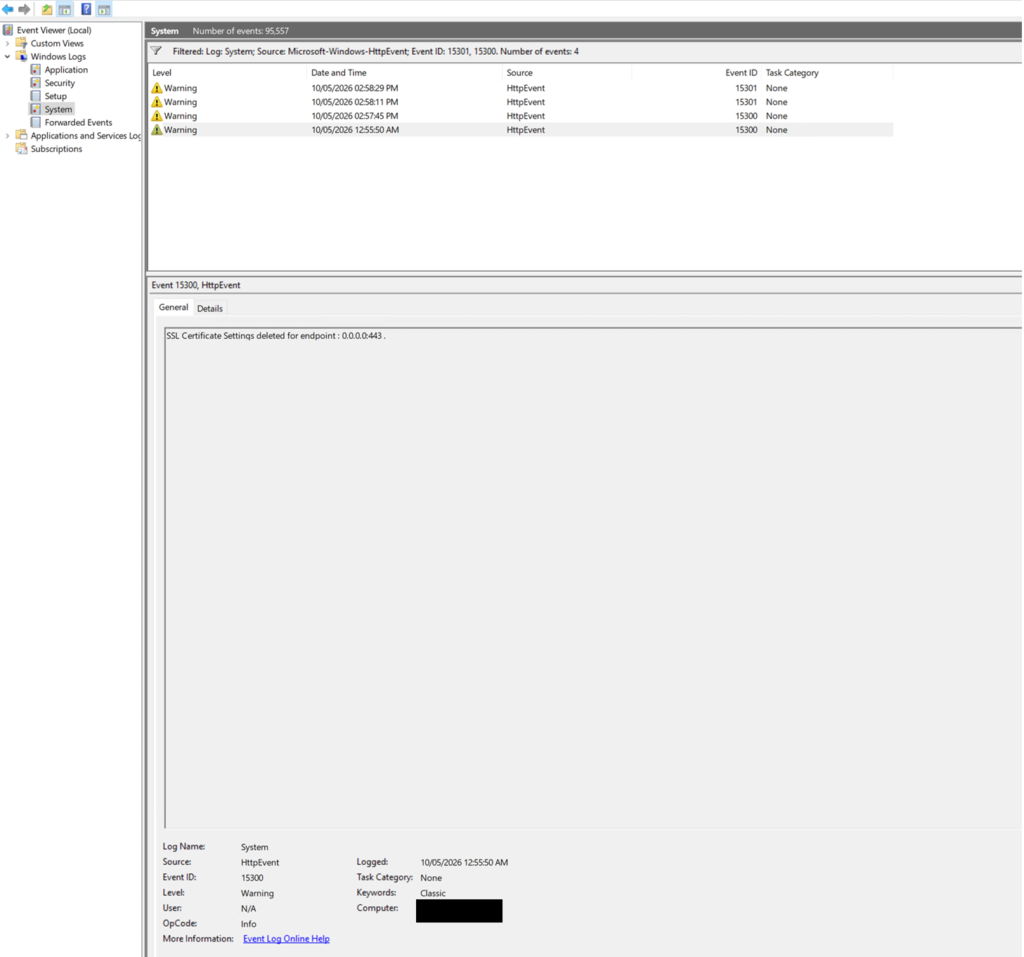
I sent an incident ticket off to Midrange. So far I haven’t heard back from them.
But at least QEM is up and running and the issue is documented so that if you come to this page in desperation; you can get QEM up and running as well and enjoy Mother’s day.