
It is a new day and a new target endpoint in Qlik Replicate for us.
What is different; it is a new target endpoint – Big Query; which we have not used before.
Usually for our Date Lake, the steps are Source System -> Qlik Replicate -> JSON files -> GCS -> DBT -> Big query.
But this use case was different, a more tactical solution to get some tables off a legacy Data Warehouse straight into Big Query and bypassing the GCS and DBT combination.
Sharing Credentials.
In our organisation credentials are stored in their own project and are separated from other GCP resources. This is so that the credentials are centrally located in one project and we are not duplicating credentials across multiple projects.
The Cloudies created a Service Account for us in project_x and pointed to a “scratchpad” dataset in project_y for Qlik Replicate to create the tables and copy across the data. We can then use the generated table schema to generate tables subsequent environments where Qlik doesn’t have create permissions.
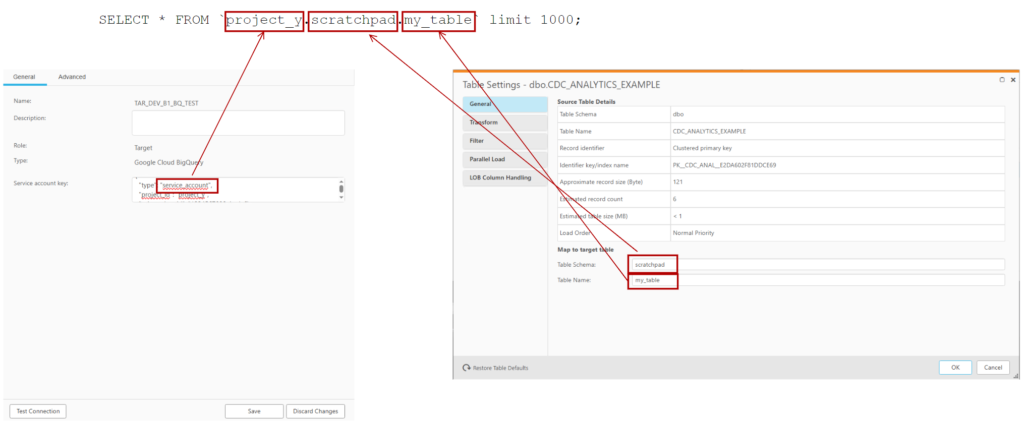
But the problem was that the credentials were in project_x; but I could not force Qlik Replicate to write to project_y. Initially I thought I needed to prefix the schema with the project; like how it appears in big query:
SELECT * FROM `project_y.scratchpad.my_table`
This didn’t work and looking at the log file with verbose turned up; I could still see it was trying to write to project_x.
I asked the Qlik forum.
While I was waiting for replies on the forum and trying a couple of suggestions; I had a look at the credential json that I downloaded from Secrets manager:
{
  "type": "service_account",
  "project_id": "project_x",
  "private_key_id": "1234567890abcdef",
  "private_key": "-----BEGIN PRIVATE KEY-----\nLongPrivateKey\n-----END PRIVATE KEY-----\n",
  "client_email": "myaccount@project_x.iam.gserviceaccount.com",
  "client_id": "123456789012345678900",
  "auth_uri": "https://accounts.google.com/o/oauth2/auth",
  "token_uri": "https://oauth2.googleapis.com/token",
  "auth_provider_x509_cert_url": "https://www.googleapis.com/oauth2/v1/certs",
  "client_x509_cert_url": "https://www.googleapis.com/robot/v1/metadata/x509/myaccount%40project_x.iam.gserviceaccount.com",
  "universe_domain": "googleapis.com"
}
Curiously, I changed the project_id value from project_x to project_y.
{
  "type": "service_account",
  "project_id": "project_y",
  "private_key_id": "1234567890abcdef",
  "private_key": "-----BEGIN PRIVATE KEY-----\nLongPrivateKey\n-----END PRIVATE KEY-----\n",
  "client_email": "myaccount@project_x.iam.gserviceaccount.com",
  "client_id": "123456789012345678900",
  "auth_uri": "https://accounts.google.com/o/oauth2/auth",
  "token_uri": "https://oauth2.googleapis.com/token",
  "auth_provider_x509_cert_url": "https://www.googleapis.com/oauth2/v1/certs",
  "client_x509_cert_url": "https://www.googleapis.com/robot/v1/metadata/x509/myaccount%40project_x.iam.gserviceaccount.com",
  "universe_domain": "googleapis.com"
}
And it worked!
Rounding out the settings
From there – it was pretty easy to work out the rest of the settings:
| Big Query Section | Were to set |
|---|---|
| Project ID | In the Endpoint credentials |
| Dataset | In the “Table Schema” for a table |
| Table Name | In the “Table Name” for a section |
If you’re writing control tables out to Big Query; you will need to add the target dataset to the task’s properties
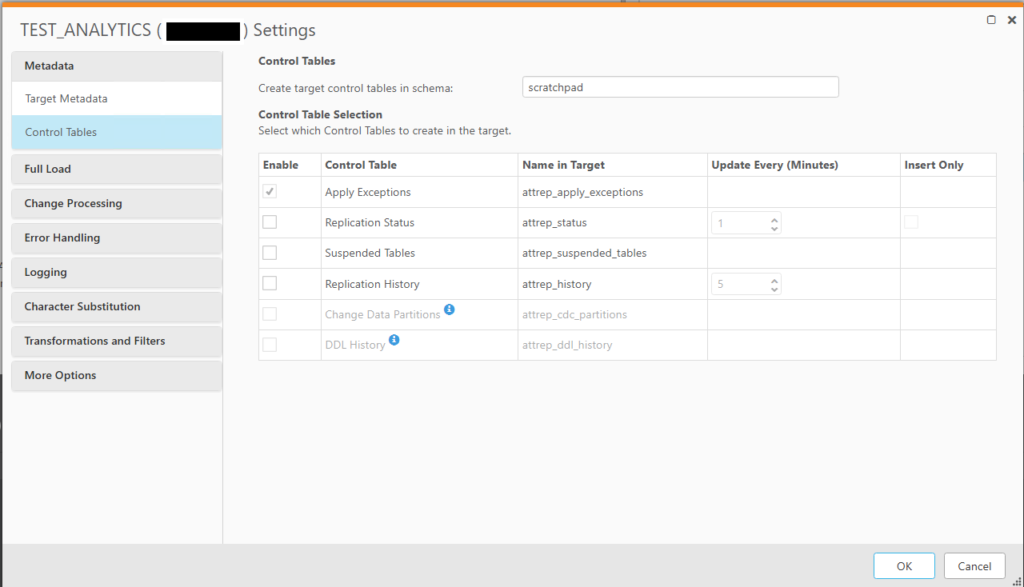
This can be found under the Qlik Replicate task’s json directory in the following location:
task_json["cmd.replication_definition"]["tasks"][0]["task_settings"]["target_settings"]["control_schema"]
Conclusion and Next Steps
We did an initial run in development as a POC and to shake out any permission issue. So far; no issues and the destination tables were created and written to in Big Query. Once we are a bit more stable; I will do a couple of rough benchmarks between writing to Big Query vs to GCS with json.
The Cloudies and Data Lake developers are now trying to work out what is the best way to manage the permissions by their infrastructure code in higher environments. In the meantime, I am modifying our QR task migration pipeline to have a variable destination table schema as the schema (which relates to dataset in Big Query) will change moving from environment to environment. It should be easy to do since we have python wrapper classes over the top of the Qlik Replicate json code. It will just be a new method to change table owners to a passed in variable.